How to Buy a Czech Digital Vignette: Step-by-Step
A detailed walkthrough of the entire purchase process, from preparation to confirmation.
Consult the Selection Matrix First →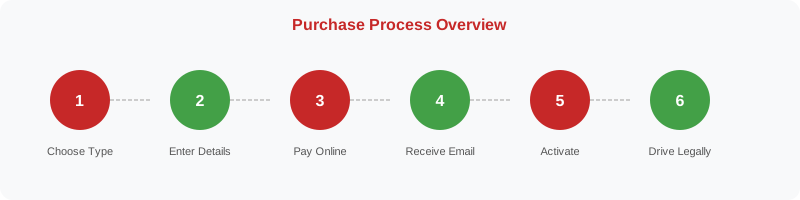
The Complete Purchase Process
The process of purchasing a Czech digital vignette is straightforward when you know what to expect. The following eight steps cover the entire journey from initial preparation to driving legally on Czech motorways.
-
1 Determine Your Vignette Needs
Before visiting any purchase portal, decide which vignette type you need. Use our selection matrix to match your travel scenario to the appropriate option. Consider your travel dates, frequency of motorway use and vehicle type. If you are unsure, the 10-day vignette is the safest starting point for a single trip.
-
2 Gather Required Information
You will need the following information ready before starting the purchase:
- Your vehicle's full licence plate number (exactly as it appears on the plate)
- The country of registration of your vehicle
- Your vehicle category (J1, J2 or J3)
- Your desired start date for the vignette
- A valid email address for the confirmation
- A payment card or online banking details
-
3 Access the Official Purchase Portal
Navigate to edalnice.cz — the official Czech digital vignette portal operated by CzechToll on behalf of the Czech Ministry of Transport. The site is available in Czech, English, German, Slovak and other languages. Alternatively, use the official CzechToll mobile app. Be cautious of unofficial third-party websites that may charge additional fees or provide invalid vignettes.
-
4 Enter Vehicle and Vignette Details
On the purchase form, enter your licence plate number, select the country of registration, choose your vehicle category, select the vignette type (10-day, 30-day or annual) and set your desired start date. Double-check every field before proceeding — errors in the licence plate number are the most common cause of invalid vignettes.
-
5 Review and Confirm Your Order
Before payment, carefully review the summary page. Verify the licence plate, vehicle category, vignette type, start date and total price. If anything is incorrect, go back and correct it. Once payment is processed, corrections may require contacting customer service.
-
6 Complete Payment
Payment can be made by credit or debit card (Visa, Mastercard) or via online banking. The payment is processed securely. There are no additional fees for card payments on the official portal, though your bank may apply foreign transaction fees if paying in CZK from a non-Czech account.
-
7 Receive and Save Confirmation
After successful payment, you will receive a confirmation email to the address you provided. This email contains your order number, vignette details and validity period. Save this email — it serves as your proof of purchase and may be required if you need to contact customer service. You do not need to display any document in your vehicle.
-
8 Verify Validity Before Driving
You can verify that your vignette has been correctly registered by checking the edalnice.cz portal using your licence plate number. This is optional but recommended, especially for first-time purchasers or if you had any doubts during the process. The vignette becomes active at 00:00 on the start date you selected.
Activation Rules
| Scenario | Activation Time | Notes |
|---|---|---|
| Start date = today | Immediately upon purchase | Can drive on motorways straight away |
| Start date = tomorrow | 00:00 tomorrow | Cannot use motorways today |
| Start date = future date | 00:00 on chosen date | Up to 30 days in advance |
| Purchase at petrol station | Same rules apply | Confirmation may be paper receipt |
What to Do If Something Goes Wrong
If you encounter a problem during or after the purchase process, follow these steps:
- Check your confirmation email for the order number and details
- Verify the vignette on edalnice.cz using your licence plate
- If the vignette is not showing as valid, contact CzechToll customer service with your order number
- If you entered the wrong licence plate, do not drive on motorways — purchase a new correct vignette immediately
- For refund requests, submit a formal request through the edalnice.cz contact form
- Keep all correspondence and order confirmations for your records